Ingesting Logs from Duppa Quad UART
Read serial output from up to four devices simultaneously using the Duppa isolated 4-port USB–UART adapter and forward every line to BunnyLogs.
The hardware
The Duppa Isolated 4-Port USB to UART FTDI is a compact board based on the FTDI FT4232H chip. It exposes four fully independent, galvanically isolated UART ports over a single USB-C connection, making it ideal for monitoring multiple embedded devices, microcontrollers, or serial sensors at once. Each port operates at 1.8 V–5 V and supports data rates up to 12 Mb/s.
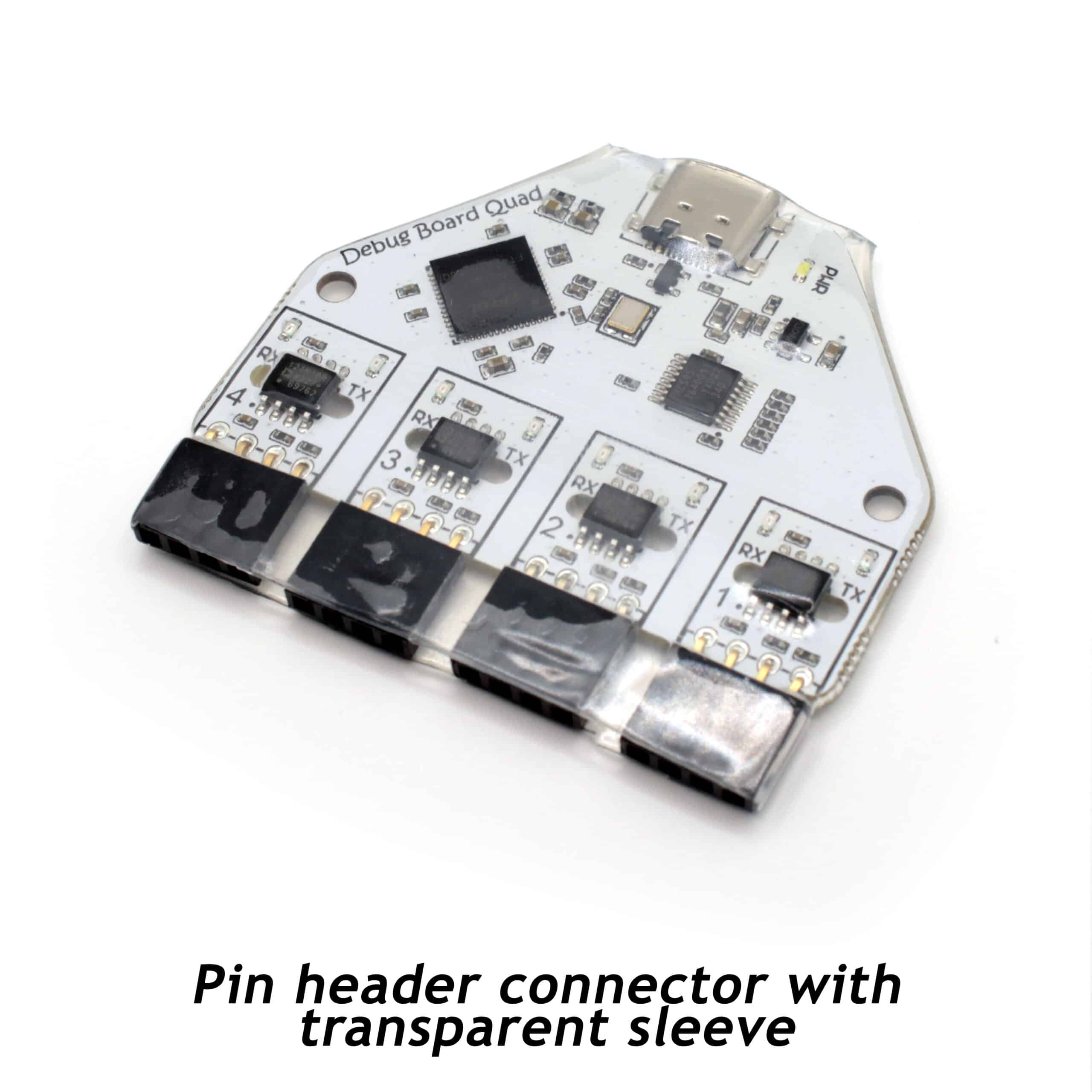
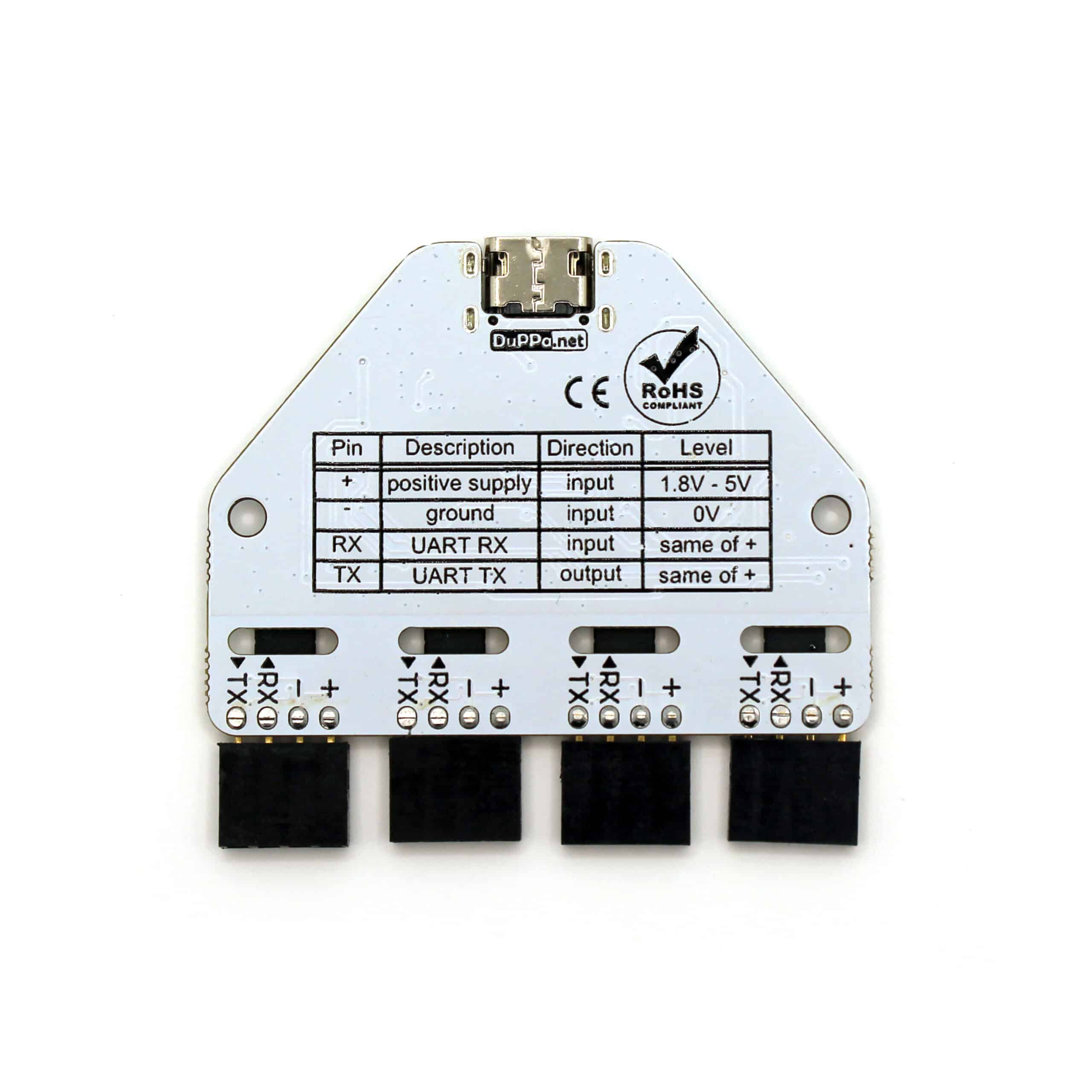
Each of the four connectors has four pins: + (1.8 V–5 V supply), − (ground), RX (data in), and TX (data out). Wire TX on your target device to RX on the Duppa port, and RX on your device to TX on the Duppa port.
Prerequisites
- Python 3.8 or later
- pyserial and bunnylogs installed
- FTDI VCP drivers (built-in on Linux and macOS; on Windows install from ftdichip.com)
- Your BunnyLogs logspace UUID
Step 1 — Find the port names
Plug the board in via USB-C. The FT4232H registers as four consecutive serial ports.
Linux
ls /dev/ttyUSB*
# → /dev/ttyUSB0  /dev/ttyUSB1  /dev/ttyUSB2  /dev/ttyUSB3
macOS
ls /dev/cu.usbserial-*
# → /dev/cu.usbserial-A  /dev/cu.usbserial-B  /dev/cu.usbserial-C  /dev/cu.usbserial-D
Windows
# Open Device Manager → Ports (COM & LPT)
# Four entries labelled USB Serial Port (COMx) will appear
You can also enumerate ports from Python:
python -m serial.tools.list_ports -vStep 2 — Install dependencies
pip install pyserial bunnylogsStep 3 — Read one port and forward to BunnyLogs
The simplest case: a single serial device whose text output you want in your log stream.
Replace /dev/ttyUSB0 and the baud rate to match your device.
import logging
import serial
from bunnylogs import BunnyLogsHandler

logger = logging.getLogger("serial")
logger.setLevel(logging.DEBUG)
logger.addHandler(BunnyLogsHandler("<uuid>"))

PORT = "/dev/ttyUSB0"   # adjust for your OS and port number
BAUD = 115200

with serial.Serial(PORT, BAUD, timeout=1) as ser:
    print(f"Reading from {PORT} at {BAUD} baud…")
    while True:
        raw = ser.readline()
        if raw:
            line = raw.decode("utf-8", errors="replace").strip()
            if line:
                print(line)
                logger.info(line)
Step 4 — Read all four ports in parallel
Each port runs in its own thread so a slow or silent device on one port never blocks the others. Each thread gets its own logger named after the port so you can filter by port in BunnyLogs.
import logging
import threading
import serial
from bunnylogs import BunnyLogsHandler

PORTS = [
    {"port": "/dev/ttyUSB0", "baud": 115200, "name": "serial/port1"},
    {"port": "/dev/ttyUSB1", "baud": 9600,   "name": "serial/port2"},
    {"port": "/dev/ttyUSB2", "baud": 115200,  "name": "serial/port3"},
    {"port": "/dev/ttyUSB3", "baud": 115200,  "name": "serial/port4"},
]

def make_logger(name: str) -> logging.Logger:
    logger = logging.getLogger(name)
    logger.setLevel(logging.DEBUG)
    logger.addHandler(BunnyLogsHandler("<uuid>"))
    return logger

def read_port(port: str, baud: int, name: str) -> None:
    logger = make_logger(name)
    with serial.Serial(port, baud, timeout=1) as ser:
        print(f"[{name}] opened {port}")
        while True:
            raw = ser.readline()
            if raw:
                line = raw.decode("utf-8", errors="replace").strip()
                if line:
                    print(f"[{name}] {line}")
                    logger.info(line)

threads = [
    threading.Thread(target=read_port, args=(p["port"], p["baud"], p["name"]), daemon=True)
    for p in PORTS
]
for t in threads:
    t.start()
for t in threads:
    t.join()
Step 5 — Run as a service (Linux systemd)
Save your script as /opt/serial-logger/logger.py, then create a unit file so it
starts automatically at boot:
# /etc/systemd/system/serial-logger.service
[Unit]
Description=Serial → BunnyLogs forwarder
After=network.target

[Service]
ExecStart=/usr/bin/python3 /opt/serial-logger/logger.py
Restart=on-failure
RestartSec=5

[Install]
WantedBy=multi-user.target
sudo systemctl daemon-reload
sudo systemctl enable --now serial-loggerTips
- On Linux, add your user to the
dialoutgroup to access serial ports withoutsudo:sudo usermod -aG dialout $USER(log out and back in to apply). - Name each logger after what is connected — e.g.
serial/motor-controller— so you can filter and alert per device in BunnyLogs. - Use
logger.warning()orlogger.error()instead oflogger.info()if your firmware prefixes lines withERROR:orWARN:— parse the prefix and call the matching log method so the level appears correctly in BunnyLogs. - The board's RX/TX LEDs will flash as data flows; a steady-dark TX LED on a port means no data is arriving from that device.
- The four ports are independent and galvanically isolated — different baud rates, voltages, and grounds are all fine on the same board.
Where to buy
The board is available directly from duppa.net for around €31–€32 (excl. VAT). A 3D-printable enclosure is available on Thingiverse.