TradingView Webhook Logger — Log Every Price Alert in Real Time
Forward TradingView price alert webhooks to BunnyLogs and watch every alert fire live in your browser — no code required, just paste your BunnyLogs URL.
TradingView supports webhook notifications on paid plans (Essential and above). When an alert triggers, TradingView sends a POST request to a URL you choose, with the alert message as the request body. Point it at your BunnyLogs ingest URL and every alert fires a log entry in real time.
Prerequisites
- A TradingView account on the Essential plan or higher (webhooks are not available on the free plan).
- 2-factor authentication enabled on your TradingView account (required to use webhook alerts).
- Your BunnyLogs logspace UUID — copy it from your stream URL:
https://bunnylogs.com/live/<uuid>
Step 1 — Create or edit an alert
Open a chart in TradingView, click the Alert button in the top toolbar (or right-click on the chart and select Add alert), and configure the condition you want to monitor.
Step 2 — Enable the webhook in the Notifications tab
In the alert dialog, go to the Notifications tab. Check the Webhook URL box and paste your BunnyLogs ingest URL:
https://bunnylogs.com/live/<uuid>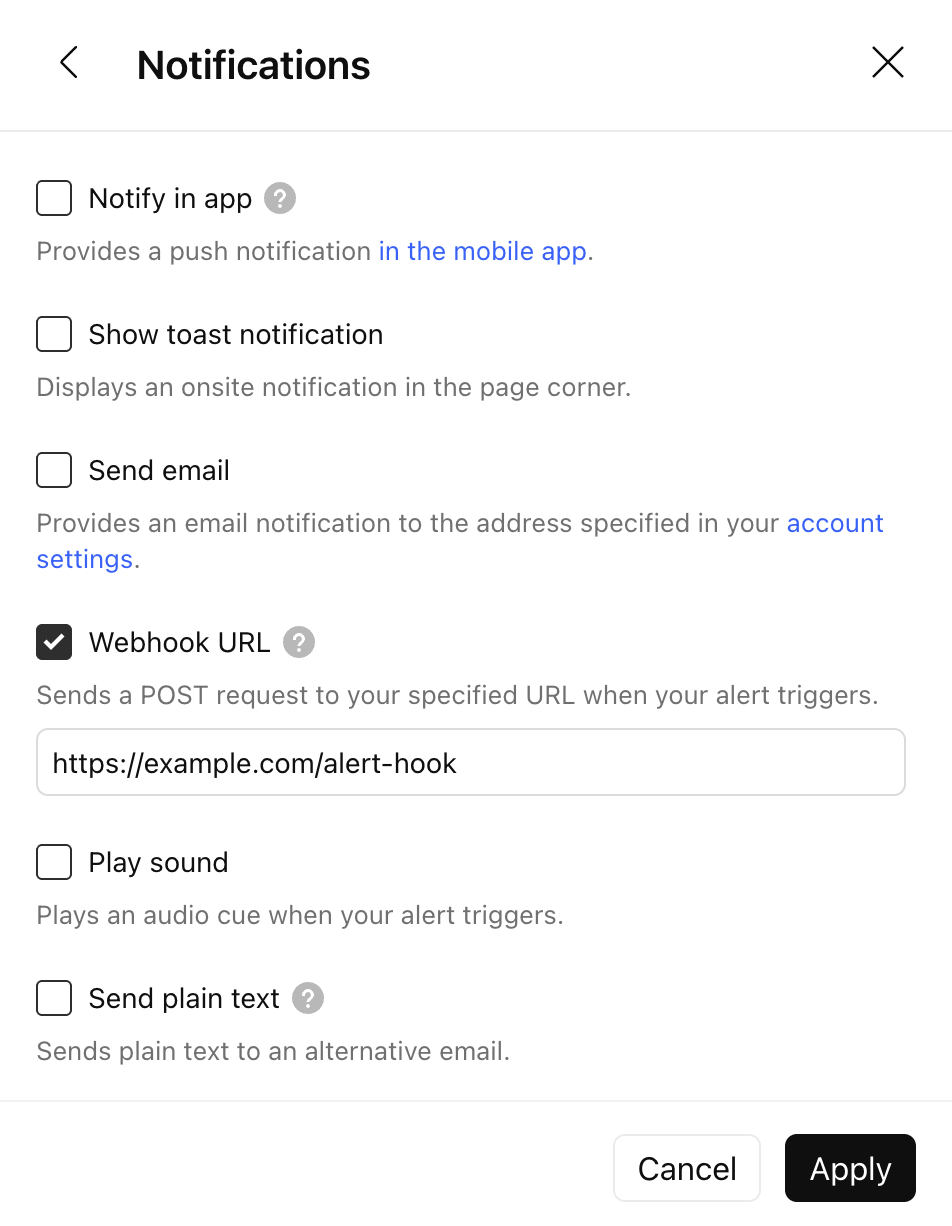
Step 3 — Configure the message body
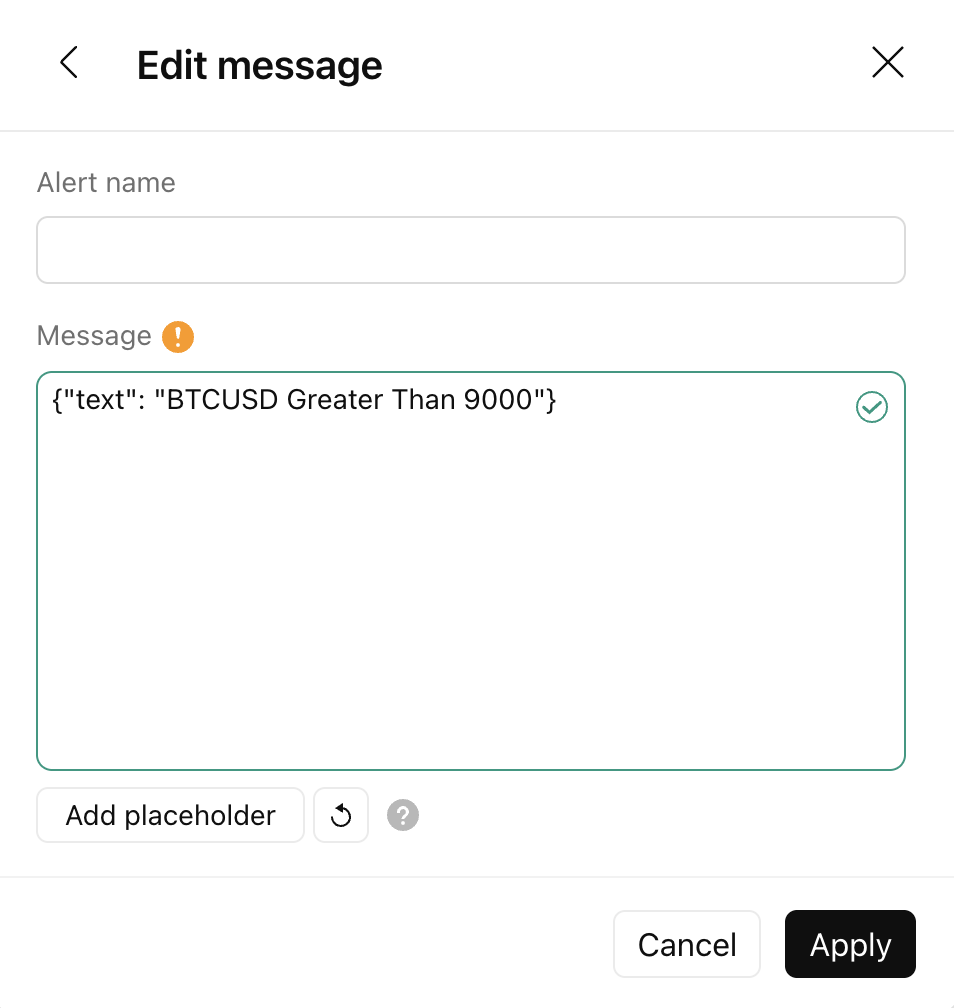
Click the back arrow to return to the alert settings and open the Edit message section. Set the Message field to a JSON object that BunnyLogs can parse:
{
  "message": "{{ticker}} — {{interval}} alert triggered at {{close}}",
  "level": "INFO",
  "program": "tradingview",
  "timestamp": "{{timenow}}"
}
TradingView automatically detects valid JSON and sends it with Content-Type: application/json.
A green checkmark appears in the message field when the JSON is valid.
Use Add placeholder to insert dynamic values like {{ticker}},
{{close}}, or {{time}} directly from TradingView's picker.
Supported JSON fields
| Field | Required | Description |
|---|---|---|
message |
Yes | The log message text. Use TradingView placeholders here. |
level |
No | Log level: INFO, WARN, or ERROR. Defaults to INFO. |
program |
No | Label shown in the stream. Defaults to api. Use e.g. tradingview or tradingview/BTCUSD. |
timestamp |
No | ISO 8601 timestamp. Omit to use server receipt time, or pass {{timenow}}. |
Useful TradingView placeholders
| Placeholder | Expands to |
|---|---|
{{ticker}} | Symbol name, e.g. BTCUSD |
{{exchange}} | Exchange name, e.g. COINBASE |
{{close}} | Closing price of the bar that triggered the alert |
{{volume}} | Volume of the triggering bar |
{{interval}} | Chart timeframe, e.g. 1D |
{{time}} | Bar open time (UTC) |
{{timenow}} | Current time when the alert fires (UTC) |
Example messages
Price crossover
{
  "message": "{{ticker}} crossed above {{close}} on {{interval}}",
  "level": "INFO",
  "program": "tradingview/{{ticker}}",
  "timestamp": "{{timenow}}"
}
Strategy alert with volume
{
  "message": "{{strategy.order.action}} {{ticker}} qty={{strategy.order.contracts}} @ {{close}}",
  "level": "INFO",
  "program": "tradingview/strategy",
  "timestamp": "{{timenow}}"
}
Error-level alert for risk management
{
  "message": "STOP HIT — {{ticker}} fell below {{close}}",
  "level": "ERROR",
  "program": "tradingview/risk",
  "timestamp": "{{timenow}}"
}
Monitoring webhook delivery
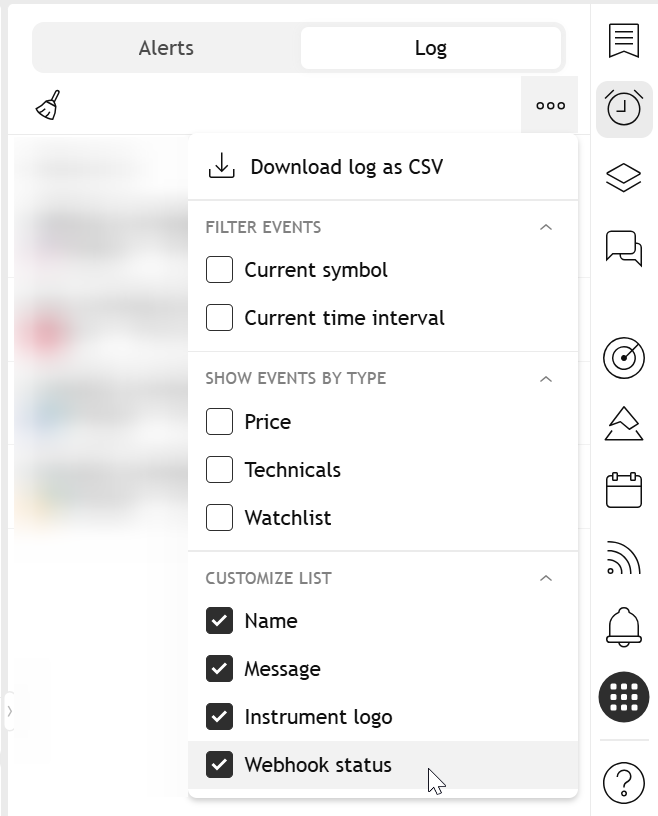
In the TradingView Alerts panel, switch to the Log tab. Enable the Webhook status column from the column picker to see whether each alert delivery succeeded or failed.
Notes
- Webhooks require the Essential plan or higher — they are not available on the free tier.
- TradingView imposes a 3-second timeout per webhook call. BunnyLogs responds well within this window.
- Only ports 80 and 443 are supported. The BunnyLogs endpoint uses port 443 (HTTPS) — no configuration needed.
- Each alert has a single webhook URL. Use the
programfield (with{{ticker}}if needed) to distinguish sources in your stream. - Set up a BunnyLogs Alert matching
programcontainstradingviewto get notified when specific conditions fire.